Vaulton — Your Secure Offline Password Vault.
Local-First • No Cloud Dependencies • No Account Creation Needed
Key Features & Modules
Everything you need for secure password management
Dashboard Overview
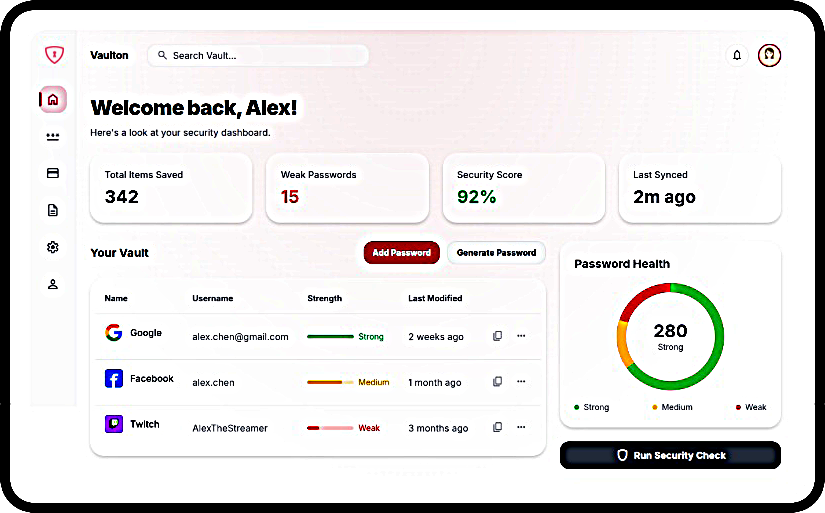
View real-time statistics including total passwords stored, last added entry, and last export date. Access quick shortcuts to add passwords, use the generator, manage backups, and review security tips.
Vault Management
Effortlessly add, edit, delete, and search entries by service or identity. Organize with categories like Personal, Work, Finance, Social Media, and specify entry types (Website or App).
Secure Password Generator
Create customizable passwords from 8 to 64 characters. Toggle uppercase, lowercase, numbers, and symbols with a real-time security level rating and one-click copy functionality.
Backup & Restore
Export your vault as an Encrypted SQLite (.db) or Unencrypted CSV (.csv). Master Password verification is required for all secure data transfers and imports.
Local-First Architecture
Your data never leaves your device. Vaulton has absolutely zero cloud dependencies, ensuring complete control and privacy over your sensitive credentials.
Security Architecture
Featuring a robust application locking mechanism to prevent unauthorized access. Your Master Password acts as the encryption key for securing exports and the app itself.
Download Vaulton
Available on your favorite desktop platforms
How Vaulton Works
Seamless, secure, and entirely localized credential management
Create Master Key
Set a strong, unique Master Password. This acts as the sole cryptographic key to encrypt your local vault and secure your data exports.
Store Data Locally
Save your website logins and app credentials. Vaulton encrypts everything instantly and stores it strictly on your device's hard drive.
Manage Backups
Generate encrypted SQLite databases or unencrypted CSV files to safeguard your information. Restore your complete vault seamlessly at any time.
Frequently Asked Questions
Get answers to common questions about Vaulton